
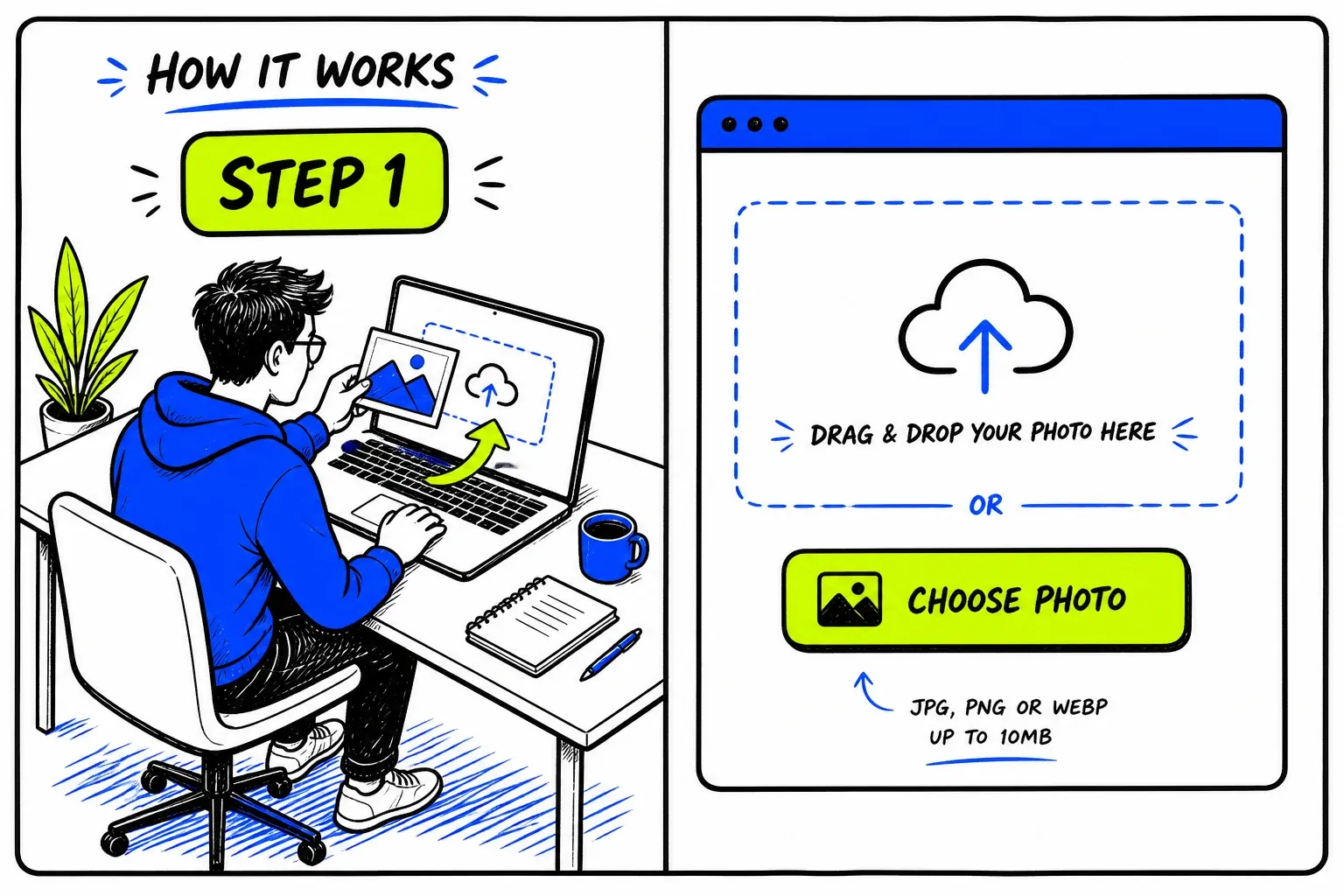
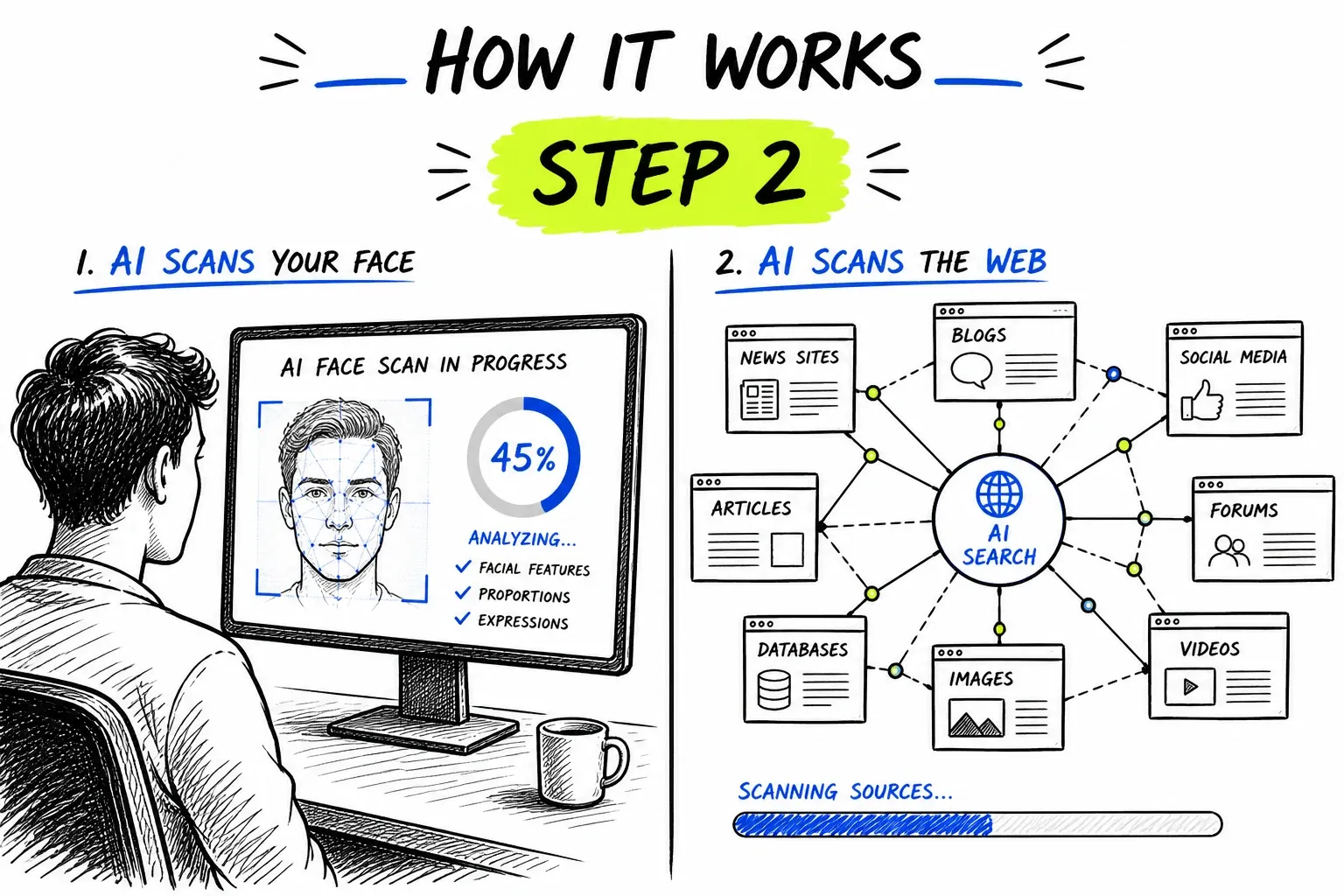
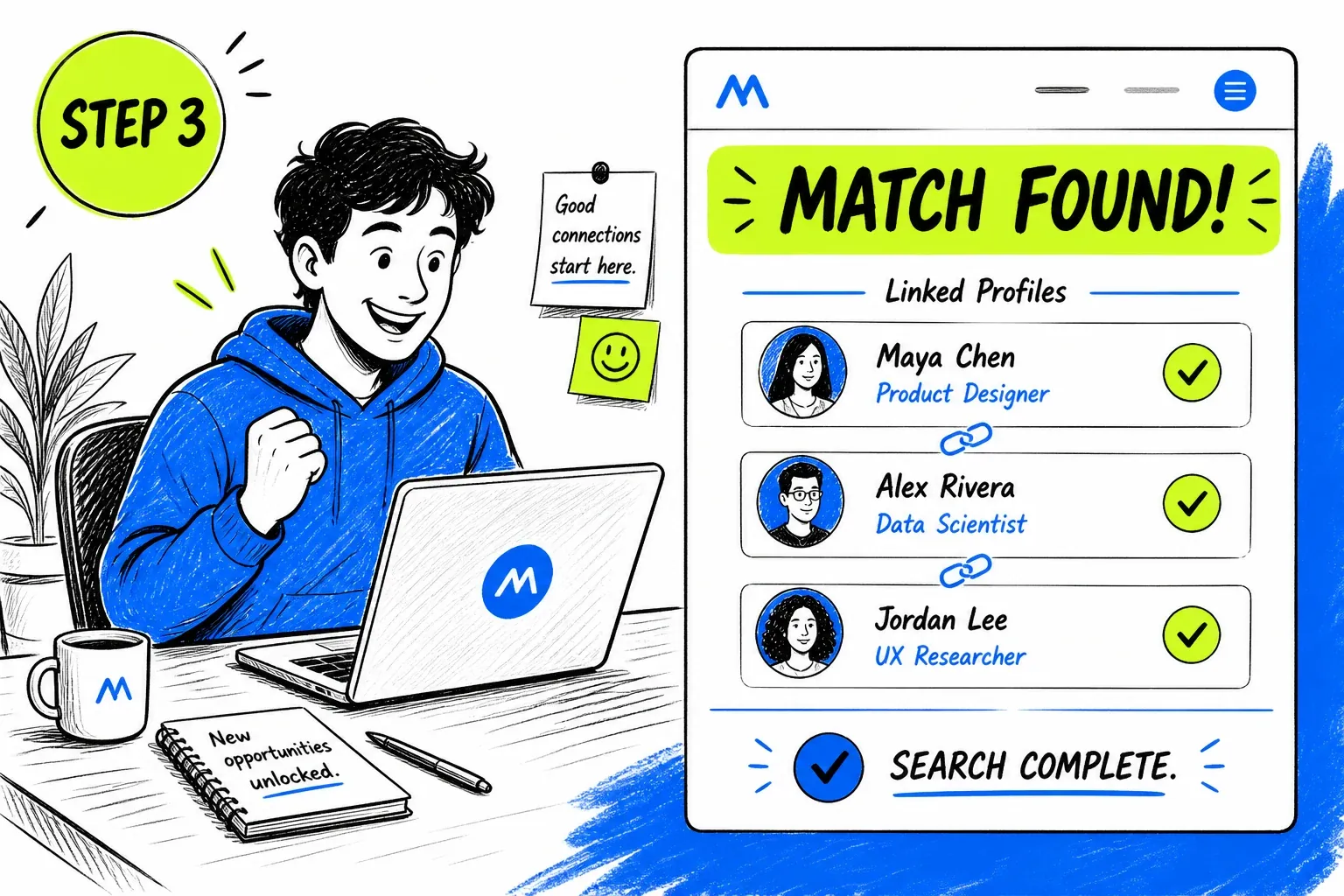
What Is a Instagram Face Search?
Instagram is a still-image platform, which makes it unusually visible to image crawlers compared with video-first networks. Public profile pictures, public grid posts, and every embedded Instagram photo sitting on a blog or news page are all ordinary web images. That visibility is also why Instagram is the single largest supply of stolen photos for fake profiles.
Worth being precise about the mechanics: this does not query Instagram directly, and no tool honestly can. It searches an index built from publicly reachable pages — which is where Instagram profile images and public posts end up once they are crawled. The same engine powers our general face search tool; this page covers what it does and does not reach on Instagram specifically.
What Is Actually Public on Instagram
Instagram's public layer is large, but the line between public and private is sharp — and it explains most empty results.
Public profile pictures
Public grid posts
Embeds on other sites
The theft layer
When a Instagram Face Search Helps
Instagram supplies most of the stolen profile photos in circulation, so a check here has unusually high yield.
Find Out If Your Photos Were Taken
Upload a photo of yourself and see whether it appears on accounts or sites you never posted to. This is the single most common reason people run an Instagram-sourced search.
- Surfaces impersonation accounts
- Gives you URLs to report
Check a Profile Before You Engage
If an account approaching you uses a photo that also appears under a different name elsewhere, that is a strong signal to stop before sharing anything personal.
- Works from a screenshot of the avatar
- Compare names across the source pages
Verify a Collaboration Offer
Fake brand and agency accounts use borrowed headshots. Searching the face behind an offer is a quick check before you send an address, an invoice, or ID documents.
- Stock photos surface right away
- Cheap step before any payment detail
Find the Source of an Uncredited Photo
When an image circulates without attribution, matching the face can point at the account or publication it came from originally.
- Follow results to the earliest posting
- Useful when metadata is stripped
Getting a Usable Photo Off the Platform
Instagram gives you better source material than most platforms. It is worth taking the extra step to capture it properly.
- Prefer a grid photo over the avatarPosts are published at far higher resolution than profile pictures. If the account has a clear face shot in the grid, use that instead.
- Open the image before capturingTap into the post so it renders full-size, then screenshot. Grabbing from the thumbnail grid throws away most of the detail.
- Skip the group shotsIf several people appear, crop to the one you mean. A search runs on a single face, and an ambiguous frame produces scattered results.
- Choose an unfiltered photoFilters that reshape the face interfere with the measurement. A plain, well-lit shot beats a stylised one every time.
The general rules — sharp, evenly lit, front-facing, one face per search — apply here too. They are covered in more depth on the face search guide.
Running a Instagram Face Search Here
High-Yield Platform, Honest Reporting
Because Instagram photos are so widely copied, searches sourced from them return more than most. Every match still arrives with the page it came from and a similarity score, so a long result list stays something you can actually check rather than a number to trust.
- Direct source link on every match
- No summary verdicts — you read the evidence
Finds Different Photos, Not Just Copies
Matching on facial structure rather than pixels means results include other photos of the same person — a different pose, a different year, a different account — not only re-uploads of the exact file. That is what exposes an identity reused across several profiles.
- Survives crops, filters, and rescaling
- One credit balance across every tool
Coverage Limits on Instagram
Instagram's public and private halves behave completely differently. Almost every disappointing result traces back to this line.
- Private accounts are entirely invisible
- Nothing from a private account reaches the open web. No tool can search it, and claims otherwise are not credible.
- Stories and Reels are ephemeral
- Temporary content is generally not indexed as still imagery, so faces appearing only there are effectively unsearchable.
- Recent posts may not be crawled yet
- Indexing lags publication. A photo posted this week may simply not have been seen yet.
- Popular accounts crowd the results
- Heavily reposted people return long lists dominated by mirrors and aggregators. Sort by reading the sources, not by result count.
- Look-alikes score highly
- Similar-looking strangers, and relatives especially, can produce confident-looking false positives. Open the page before concluding anything.
- A match is not an identity
- Names attached to results come from the pages themselves, and pages get names wrong. Treat every one as a lead to verify.
Privacy and Responsible Use
This searches publicly published material only. It does not access Instagram accounts, private profiles, direct messages, or anything behind a login, and it cannot surface what was never made public.
Your uploaded photo is passed to our search provider to run the query and removed from our servers immediately afterwards. Searches are not published, and the person in the photo receives no notification.
Finding someone's photos is easy; deciding you have a right to act on that is a separate question. If a search would not survive being explained to the person in the photo, it is worth reconsidering.
Before you search
- Only upload photos you have the right to use.
- Have a reason you would be comfortable stating out loud.
- Treat every match as a lead to check, never as a confirmed fact.
- Never use results to contact, follow, pressure, or expose someone.
- Do not use this tool for employment, credit, housing, or insurance screening — it is not a consumer reporting agency.
- Report impersonation to Instagram through their own reporting flow rather than acting on it yourself.
Frequently asked questions
Can I search Instagram by face?
Not within Instagram — it provides no face search. What works is searching an Instagram photo against publicly indexed pages, which include public profile pictures, public posts, embeds on other sites, and copies of those photos wherever they have been reposted.
How do I find someone's Instagram from a photo?
Upload the clearest photo of the face you have. If that person has a public Instagram presence that has been crawled — or their photo has been copied anywhere — the matching pages come back with links. A private account will return nothing.
Can I check whether someone is using my Instagram photos?
Yes, and it is one of the most reliable uses of this tool. Upload a photo of yourself and look for accounts or sites in the results that you do not recognise.
Does this work on private Instagram accounts?
No. Private accounts publish nothing to the open web, so there is nothing to index and nothing to find. Any service claiming to search private accounts is misrepresenting what it does.
Will the account owner know I searched?
No. The search does not touch Instagram, so no view, notification, or trace is created on the platform.
Where to Go Next
One index sits behind all of these — the difference is the question you are asking of it.
Guides & resources
Read in-depth guides that match this tool — tips, statistics, and step-by-step walkthroughs.