How to Reverse Image Search a Bumble Profile and Find Someone by Photo
Meeting someone on Bumble can start with only a few photos and a short bio. Before meeting in person, you may want to check whether those photos appear somewhere else online, whether the same face is connected to other public profiles, or whether a suspicious account may be using stolen images.
A Bumble reverse image search gives you another way to investigate a profile using the photo itself instead of relying only on a name, username, or phone number.
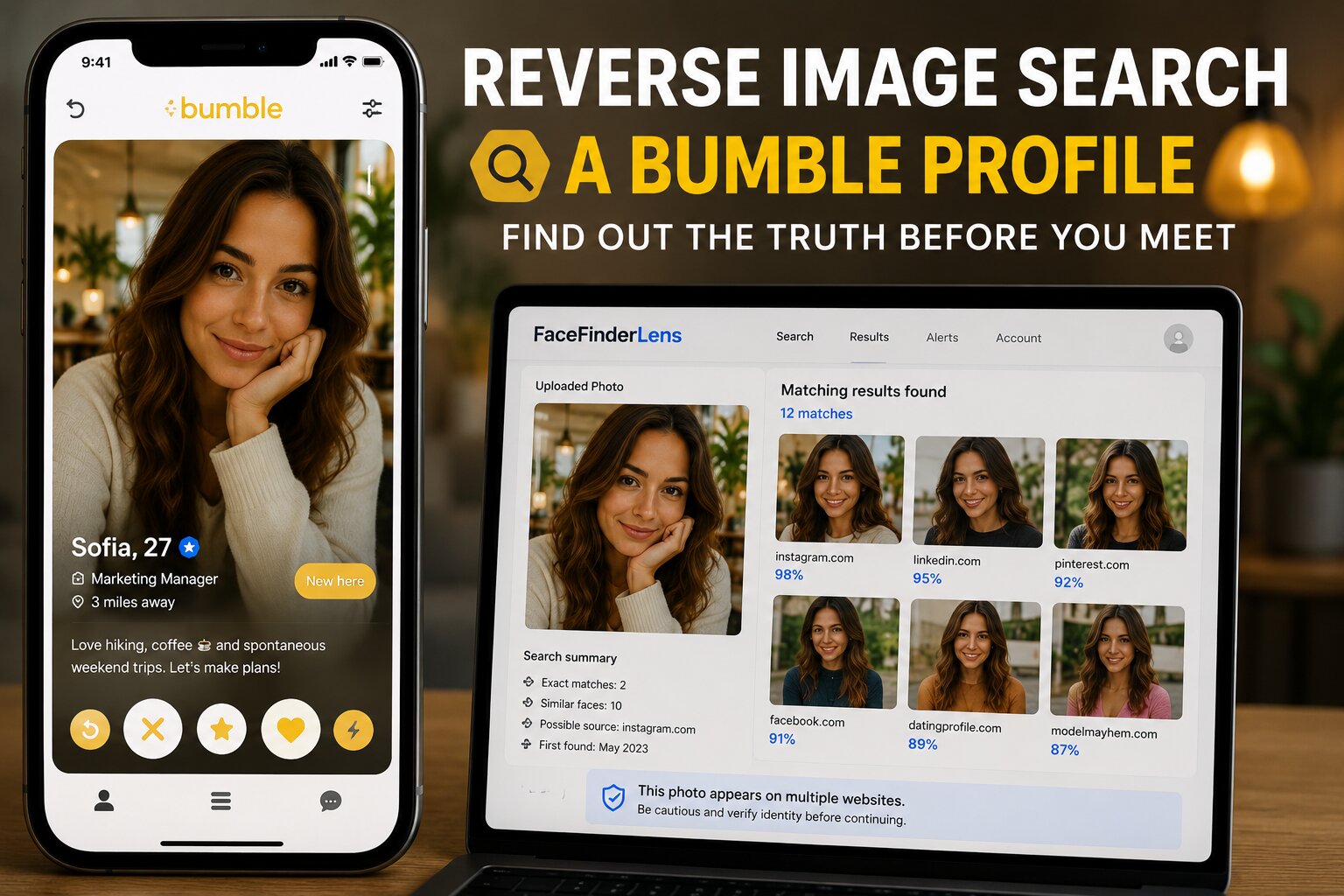
Bumble does not provide a built-in feature that lets you upload a photo and search its users by image. However, reverse image search and face-search tools can help you check whether a Bumble profile photo—or the same face in another photograph—appears elsewhere on the public web.
In this guide, we’ll explain how to search a Bumble profile by photo, how face search differs from traditional reverse image search, what results to look for, and what a photo search can and cannot prove.
Can You Search for Someone on Bumble by Photo?
Bumble itself does not offer a public “search by photo” feature.
You cannot simply upload someone’s picture inside Bumble and request every profile containing that person.
What you can do is take a clear screenshot or saved profile photo and use an external reverse image or face-search tool to look for publicly available matches.
Depending on the photograph and what is publicly indexed online, a search may uncover:
- Other public profiles using the same face
- Copies of the exact profile picture
- Older versions of the photograph
- Different names connected with matching images
- Social media accounts
- Dating-related pages
- Websites where the image was previously published
This can be particularly helpful when you’re trying to determine whether a Bumble profile appears consistent with someone’s broader online presence.
Why Someone Might Reverse Image Search a Bumble Profile
Verify a New Bumble Match
Before meeting someone you’ve only spoken with online, you might want an additional way to check whether their photos appear consistent with the identity they presented.
Finding an established public profile with matching information may provide useful context.
Finding the same photos connected to completely different identities can raise questions worth investigating.
Check for a Catfish Profile
Catfishing involves presenting a false online identity, often using another person’s pictures.
Bumble prohibits catfishing, impersonation, using another person’s photographs, and using artificially generated photos to deceive other members.
A reverse image search can sometimes uncover where a stolen profile picture originally appeared.
Investigate a Suspicious Dating Profile
A photo search can be useful when other details also seem unusual—for example:
- Their story frequently changes
- They refuse every video call
- Their photos look unusually professional
- Their age or location seems inconsistent
- They quickly ask to move communication elsewhere
- They eventually ask for money or financial assistance
A photo result alone shouldn’t be treated as proof of wrongdoing, but it can provide another piece of evidence.
Find an Older Public Appearance of a Photo
Sometimes the goal isn’t detecting fraud.
You may simply want to understand whether an image has already appeared on a public website or social account.
Traditional reverse image search can be useful for this because it looks for identical or visually similar copies.
How to Reverse Image Search a Bumble Profile in 4 Steps
Step 1: Choose the Clearest Bumble Photo
Start with a photograph where the person’s face is clearly visible.
Ideally, use:
- A forward-facing portrait
- Good lighting
- Minimal blur
- No sunglasses covering the eyes
- No masks
- Minimal filters
- Only one clearly visible person
Group pictures can produce confusing results because the search tool may not know which face you’re investigating.
If you have several Bumble photos, save more than one. You can search each separately later.
Step 2: Take a Screenshot or Save the Photo
If the image is available inside the Bumble app, take a screenshot.
Then crop away unnecessary interface elements such as:
- Buttons
- Captions
- Bumble navigation
- Other people
- Large empty areas around the person
Keep enough of the original image that the face remains clear.
You do not need a perfect original image for every search. FaceFinderLens is designed to work with profile pictures, screenshots, and cropped face images.
Step 3: Run a Reverse Face Search
Upload the image to FaceFinderLens Image Search:
A traditional image engine primarily tries to locate copies or visually similar versions of an image.
A face-oriented search instead analyzes facial characteristics to look for matching appearances across indexed public sources.
That distinction matters.
Imagine someone uses Photo A on Bumble but Photo B on another public profile.
The two files may have completely different backgrounds, clothing, image dimensions, lighting, and compression.
A pixel-based image search may fail to connect them.
Face matching is designed to recognize similarities between the faces even when the actual photographs are different.
Step 4: Compare the Results Carefully
Don’t focus only on whether you received a match.
Look at the context surrounding each result.
Compare:
- Name
- Approximate age
- Location
- Occupation
- Social profiles
- Dates
- Other photographs
- Profile history
One difference does not automatically indicate deception.
People move, change jobs, use nicknames, and maintain old accounts.
You’re looking for patterns of major inconsistencies, not minor differences.
Reverse Image Search vs Face Search for Bumble
These technologies are often discussed as if they’re identical, but they’re useful for different things.
Traditional Reverse Image Search
Traditional reverse image search is best when you’re trying to find the same photograph.
It can help identify:
- Exact duplicates
- Cropped copies
- Resized images
- Websites republishing a photograph
- Possible original image sources
Google Lens and TinEye are common examples.
Reverse Face Search
Reverse face search focuses on the person’s facial characteristics rather than requiring the exact same image.
It can therefore be more useful when someone uses different photos across Bumble, social media, forums, or other public websites.
For dating-profile verification, combining both approaches can produce more useful information than relying on only one.
How to Interpret Bumble Photo Search Results
The Same Photo Appears Under Another Name
Suppose a Bumble match introduces himself as “Daniel.”
You search one of his photographs and discover that the identical image was posted years earlier on a long-established profile belonging to someone called “Michael.”
That is worth investigating carefully.
Check:
- Which page appears older?
- Is one profile clearly established?
- Are there years of normal posting history?
- Is the location consistent?
- Does one source look like the likely original?
The older, established source can help you determine whether another account may have reused the photo.
The Same Face Appears in Different Photos
This is where face search can be especially useful.
You might not find the exact Bumble photograph anywhere else, but you may find apparently matching facial appearances connected to other public pages.
Again, compare the surrounding information rather than assuming a match automatically establishes identity.
The Photo Appears on Multiple Dating Profiles
Seeing the same image repeatedly attached to different names, locations or ages can be a meaningful red flag.
It doesn’t by itself explain which account is legitimate, but it gives you a reason to verify the situation before trusting the profile.
The Search Finds Nothing
No result does not mean the Bumble profile is genuine.
A photo may not appear in search results because:
- It was never posted publicly
- The original profile is private
- The page isn’t indexed
- The image is new
- The photograph was heavily edited
- The person has a limited online footprint
- The image may be AI-generated
Treat “no matches” as no evidence found, not as identity verification.
Does Bumble Photo Verification Mean a Profile Is Real?
Bumble has its own Photo Verification feature.
Verification helps check whether the person using the account resembles the person shown in the profile photographs.
That’s useful—but there is an important distinction.
Photo verification primarily helps establish:
“This person resembles the person shown in these photos.”
It shouldn’t automatically be interpreted as independent confirmation of every biographical statement in a profile.
Things such as someone’s:
- Job
- Relationship status
- Education
- Intentions
- Personal history
may require other context.
Bumble also provides ID verification and additional safety features.
Can You Find an Expired Bumble Match by Photo?
Bumble matches may expire if communication does not begin within the available time window.
If a profile is no longer accessible to you but you previously saved a photo or screenshot, that image can still potentially be checked against publicly indexed sources.
However, there is an important distinction:
A reverse face search might help locate other public appearances of the same face.
It does not guarantee that you can recover the original Bumble profile.
Think of it as searching the broader public web for visual matches—not restoring Bumble data.
How to Get Better Results from a Bumble Photo
Use a Clear Headshot
A clear portrait will usually provide more useful facial information than a full-body photograph taken from far away.
Avoid Group Photos
Crop the image around the person you actually want to search.
Try Multiple Photos
Don’t stop after one failed search.
Different images may have very different online histories.
For example:
Bumble photo #1 → no useful matches
Bumble photo #2 → matching social profile
Bumble photo #3 → older copy of the image
Avoid Extreme Filters
Heavy beauty filters, blur, distorted facial features, masks, or strong overlays can make matching more difficult.
Search the Full Image Too
If face search doesn’t return enough context, try the original full photograph with a traditional reverse image engine.
Sometimes a background, watermark, cropped logo, or other visual element can reveal where an image came from.
How to Check Whether a Bumble Profile Might Be a Catfish
Reverse image search is most useful when combined with other verification methods.
Check Photo Consistency
Search two or three profile photographs.
If one leads to an established identity that clearly conflicts with the Bumble profile, investigate further.
Ask for a Video Call
A live conversation can provide information that static photos cannot.
Look for Behavioral Red Flags
Be more cautious when several warning signs appear together:
- Avoiding video calls repeatedly
- Constant excuses about meeting
- Quickly declaring strong feelings
- Asking you to leave Bumble immediately
- Requesting money
- Introducing investment opportunities
- Providing inconsistent personal details
Use Bumble’s Safety Features
Bumble provides safety tools such as profile verification, in-app communication features, reporting, and blocking.
If you believe a profile is impersonating someone or attempting fraud, use the platform’s reporting tools.
What If the Bumble Photo Is AI-Generated?
Stolen images aren’t the only possibility.
An AI-generated face can create a special challenge for traditional reverse image search.
If the person pictured never existed, there may be no original Instagram account, old website, or other profile to discover.
That’s another reason why:
No reverse-image matches ≠ genuine profile.
If a profile seems suspicious despite producing zero matches, consider additional checks:
- Look for inconsistent image details
- Compare several profile photos
- Ask for a live video call
- Check story consistency
- Use AI-image analysis where appropriate
Bumble Reverse Image Search vs Google Lens
Google Lens can be a good first step when you suspect the exact same photograph exists elsewhere online.
A dedicated face search is better suited to another question:
Does this same face appear in other photographs?
Find the exact Bumble photo
Best approach: Traditional reverse image search
Find cropped copies
Best approach: Traditional reverse image search
Find the same person in different photos
Best approach: Reverse face search
Find where an image was originally published
Best approach: Reverse image search
Compare facial appearances
Best approach: Face search
Check suspicious dating profile photos
Best approach: Use both
For a catfish investigation, using face search together with exact-image matching can provide broader coverage.
Use FaceFinderLens to Check a Bumble Profile Photo
If you’re unsure about a Bumble profile, start with the photograph you already have.
Upload a clear screenshot or saved profile image to FaceFinderLens and check for other public appearances of the same face.
Start a Catfish Reverse Image Search:
FaceFinderLens is designed for reverse face search, profile-photo checks, catfish detection, and suspicious dating-profile research.
Frequently Asked Questions
Can I reverse image search someone on Bumble?
Yes. You can save or screenshot a profile picture and use an external reverse image or face-search tool. Bumble itself does not provide a public reverse-image-search function.
Can I find a Bumble profile using only a photo?
Potentially, but it isn’t guaranteed. A face search may uncover public pages or profiles containing a matching face, depending on what is publicly available and indexed.
What is the best photo to use?
Choose a clear, front-facing photograph with good lighting and one visible face. Avoid group shots, extreme filters, heavy blur, masks, and sunglasses.
Can Google Lens find Bumble profiles?
Google Lens can help locate identical or visually similar images on publicly accessible web pages. A face-search tool may be more useful when the same person appears in different photographs.
Does a Bumble verification badge guarantee everything on the profile is true?
No. Profile verification can help check that a person matches their profile photos, but it should not be treated as independent verification of every personal statement they make.
What if my Bumble reverse image search finds no results?
It doesn’t prove the profile is authentic. The photograph may be private, new, unindexed, altered, or potentially generated artificially.
Can reverse image search prove that someone is a catfish?
Not by itself. A strong conflict—such as the same photographs belonging to a clearly established different identity—can be significant evidence, but results should be evaluated together with profile details and behavior.
Is it safe to search a Bumble profile photo?
Use search tools for legitimate verification and personal-safety purposes. Don’t use results to harass, threaten, impersonate, or invade someone’s privacy.